---
title: "Roastuino"
url: "https://github.com/mas-4/coffee-roaster/"
featureImage: "/projects/roastuino.jpg"
short: "roastuino"
category: "hardware"
ai: ""
order: "19"
year: "2021"
tags: ["arduino", "c++", "modbus"]
---
As part of my continuing obsession with coffee I discovered that I could get a
lot cheaper specialty coffee, roasted closer to my personal taste, from the
regions I prefer (East Africa), by just roasting myself. [Sweet Maria's][0]
provides troves of information about how to home roast, and one of the
suggestions they make for first timers is to use an inexpensive popcorn popper.
They recommend the Nostalgia.

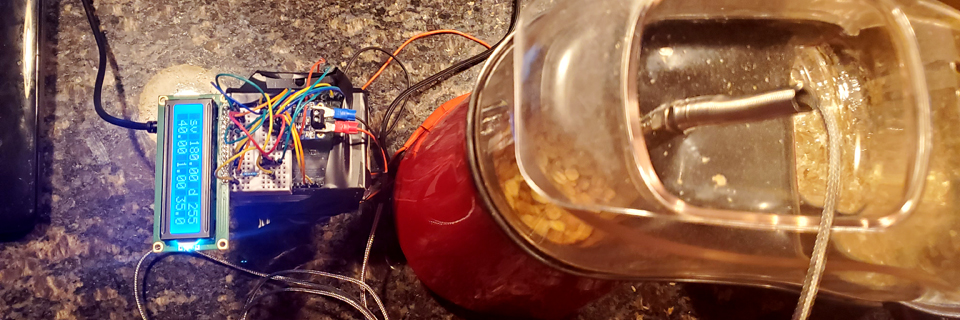
So I bought it, and was dissatisfied with the lack of control I had. I found out
that there are a not insignificant number of home roasters who tried hooking up
a PID controller to their popcorn popper (or generally modding it), and I found
[this decent write up][1] on how to use an Arduino to hook up the heating element to
a 40A relay and use a thermocouple with an RTU Modbus implementation to
communicate with [Artisan Scope][2], a professional grade open source program
written in Python for monitoring and controlling roast parameters (more meant
for large machines, but...)

There are some problems with Lukas' write up. Namely, that Artisan's internal
PID system is really hard to get working. I ended up building in an internal PID
using an Arduino library (you can see my code [here][3]). So Artisan just sends
the PID values and the SV and monitors the temperature. I also found it
unnecessary to use a Mosfet between the Arduino and the relay. And for
debugging, I added an LCD screen (which is how I discovered that Artisan's PID
was never working in the first place).

This project was insane fun. As a programmer, I often get a kick out of some
piece of software working. But making something do stuff in meatspace is a rush
I'd never experienced before. It was also the first time I'd done real
soldering. It was a lot easier than I expected.

- Arduino Uno R3 from Elegoo
- MAX31855 Thermocouple Amplifier breakout board from Adafruit with a K-type
  thermocouple
- HD44780 LCD
- Inkbird 40DA SSR
- Artisan Scope
- Various Arduino libraries

[0]: https://www.sweetmarias.com
[1]: https://medium.com/@lukasgrasse/how-to-make-an-arduino-controlled-coffee-roaster-f6a3334fd7d5
[2]: https://artisan-scope.org/
[3]: https://github.com/mas-4/coffee-roaster/blob/master/roastuino/roastuino.ino
<sky-template path="main.html" />

<sky-block name="title">${frontmatter.title} · </sky-block>

<sky-block name="content">
  <article class="project">
    <a class="back" href="/projects">← all projects</a>
    <p class="pills"><span class="pill">${frontmatter.category}</span><span class="pill pill-ai">${frontmatter.ai}</span><span class="year">${frontmatter.year}</span></p>
    <h1>${frontmatter.title}</h1>
    <a class="visit" href="${frontmatter.url}">${frontmatter.url}</a>
    <img class="feature" src="${frontmatter.featureImage}" alt="" />
    <div class="markdown">
      <sky-slot name="content" />
    </div>
  </article>
</sky-block>
<!DOCTYPE html>
<html lang="en">
  <head>
    <meta charset="UTF-8" />
    <script><sky-include path="theme.js" /></script>
    <meta name="viewport" content="width=device-width, initial-scale=1.0" />
    <title><sky-slot name="title" />${meta.title}</title>
    <meta name="description" content="${meta.description}" />
    <meta name="theme-color" content="#142420" />
    <link rel="icon" href="/favicon.svg" type="image/svg+xml" />
    <link rel="stylesheet" href="/style.css" />
  </head>
  <body>
    <!-- Every page is a sheet of paper lying on the source it was built
         from. This checkbox lifts the sheet; no JavaScript involved. -->
    <input type="checkbox" id="xray" class="xray" aria-label="Show the source of this page" />
    <div class="desk">
      <div class="sheet">
        <!-- Under the paper, the page's source, for the candle to show. -->
        <div class="underside" aria-hidden="true"><sky-sources item="underside.html" /></div>
        <div class="paper" aria-hidden="true"></div>
        <svg class="flame" viewBox="0 0 24 44" aria-hidden="true">
          <defs>
            <radialGradient id="flame-body" cx="50%" cy="78%" r="62%">
              <stop offset="0" stop-color="#fffbe8" />
              <stop offset="0.35" stop-color="#ffe08a" />
              <stop offset="0.7" stop-color="#ff9a2e" />
              <stop offset="1" stop-color="#e2470f" stop-opacity="0" />
            </radialGradient>
            <radialGradient id="flame-core" cx="50%" cy="80%" r="55%">
              <stop offset="0" stop-color="#ffffff" />
              <stop offset="0.6" stop-color="#fff3c4" />
              <stop offset="1" stop-color="#ffd166" stop-opacity="0" />
            </radialGradient>
          </defs>
          <path class="flame-body" fill="url(#flame-body)" d="M12 1C15 11 22 18 21 29 20 37 16 43 12 43 8 43 4 37 3 29 2 18 9 11 12 1Z" />
          <path class="flame-core" fill="url(#flame-core)" d="M12 15C14 21 17 26 16.5 32 16 37 14 40 12 40 10 40 8 37 7.5 32 7 26 10 21 12 15Z" />
          <ellipse class="flame-base" cx="12" cy="40" rx="3.2" ry="2" fill="#5aa9ff" opacity="0.45" />
        </svg>
        <label for="xray" class="curl" title="Lift the page to see what it's made of" aria-hidden="true"></label>
        <label for="xray" class="sheet-cover" title="Back to the page"></label>
        <sky-include path="_nav.html" />
        <main class="page">
          <sky-slot name="content" />
        </main>
        <sky-include path="_footer.html" />
      </div>
      <aside class="ground" aria-label="The source of this page">
        <header class="ground-head">
          <p>
            <a href="https://github.com/mas-4/skyblue">skyblue</a> built this
            page from these files, in the order it used them.
          </p>
          <label for="xray" class="ground-close">back to the page →</label>
        </header>
        <sky-sources item="source.html" />
      </aside>
    </div>
    <script><sky-include path="candle.js" /></script>
  </body>
</html>
// The light switch. Until it's flipped, the page follows the system's
// light or dark preference (that part is CSS). Flipping it picks the other
// one and remembers it. This runs in <head>, so a saved choice applies
// before the page is drawn.
(() => {
  const root = document.documentElement;
  const system = matchMedia("(prefers-color-scheme: dark)");
  try {
    const saved = localStorage.getItem("theme");
    if (saved === "light" || saved === "dark") root.dataset.theme = saved;
  } catch {}

  const isDark = () => (root.dataset.theme ? root.dataset.theme === "dark" : system.matches);

  document.addEventListener("DOMContentLoaded", () => {
    const button = document.querySelector(".theme-toggle");
    if (!button) return;
    const show = () => button.setAttribute("aria-checked", String(isDark()));
    button.hidden = false;
    show();
    system.addEventListener("change", show);
    button.addEventListener("click", () => {
      root.dataset.theme = isDark() ? "light" : "dark";
      try {
        localStorage.setItem("theme", root.dataset.theme);
      } catch {}
      show();
    });
  });
})();
<header class="site-header">
  <nav class="nav">
    <a class="brand" href="/">
      <svg class="brand-mark" viewBox="0 0 32 32" aria-hidden="true">
        <path d="M2 13c4 0 4-3 7-3s3 3 7 3 4-3 7-3 3 3 7 3" />
        <path d="M2 20c4 0 4-3 7-3s3 3 7 3 4-3 7-3 3 3 7 3" />
      </svg>
      ${meta.title}
    </a>
    <div class="nav-links">
      <a href="/">home</a>
      <a href="/about">about</a>
      <a href="/projects">projects</a>
      <a href="/orbits">orbits</a>
      <label for="xray" class="source-toggle" title="Lift the page to see what it's made of">source</label>
    </div>
    <button type="button" class="theme-toggle" role="switch" aria-checked="false" aria-label="Dark mode" title="Light or dark" hidden><span class="knob"></span></button>
  </nav>
</header>
<footer class="site-footer">
  <div class="social">
  <a href="https://github.com/mas-4">
    <svg
      aria-labelledby="svg-inline--fa-title-Yppzrr98YU17"
      role="img"
      xmlns="http://www.w3.org/2000/svg"
      viewBox="0 0 496 512"
    >
      <title id="svg-inline--fa-title-Yppzrr98YU17">GitHub</title>
      <path
        fill="currentColor"
        d="M165.9 397.4c0 2-2.3 3.6-5.2 3.6-3.3.3-5.6-1.3-5.6-3.6 0-2 2.3-3.6 5.2-3.6 3-.3 5.6 1.3 5.6 3.6zm-31.1-4.5c-.7 2 1.3 4.3 4.3 4.9 2.6 1 5.6 0 6.2-2s-1.3-4.3-4.3-5.2c-2.6-.7-5.5.3-6.2 2.3zm44.2-1.7c-2.9.7-4.9 2.6-4.6 4.9.3 2 2.9 3.3 5.9 2.6 2.9-.7 4.9-2.6 4.6-4.6-.3-1.9-3-3.2-5.9-2.9zM244.8 8C106.1 8 0 113.3 0 252c0 110.9 69.8 205.8 169.5 239.2 12.8 2.3 17.3-5.6 17.3-12.1 0-6.2-.3-40.4-.3-61.4 0 0-70 15-84.7-29.8 0 0-11.4-29.1-27.8-36.6 0 0-22.9-15.7 1.6-15.4 0 0 24.9 2 38.6 25.8 21.9 38.6 58.6 27.5 72.9 20.9 2.3-16 8.8-27.1 16-33.7-55.9-6.2-112.3-14.3-112.3-110.5 0-27.5 7.6-41.3 23.6-58.9-2.6-6.5-11.1-33.3 2.6-67.9 20.9-6.5 69 27 69 27 20-5.6 41.5-8.5 62.8-8.5s42.8 2.9 62.8 8.5c0 0 48.1-33.6 69-27 13.7 34.7 5.2 61.4 2.6 67.9 16 17.7 25.8 31.5 25.8 58.9 0 96.5-58.9 104.2-114.8 110.5 9.2 7.9 17 22.9 17 46.4 0 33.7-.3 75.4-.3 83.6 0 6.5 4.6 14.4 17.3 12.1C428.2 457.8 496 362.9 496 252 496 113.3 383.5 8 244.8 8zM97.2 352.9c-1.3 1-1 3.3.7 5.2 1.6 1.6 3.9 2.3 5.2 1 1.3-1 1-3.3-.7-5.2-1.6-1.6-3.9-2.3-5.2-1zm-10.8-8.1c-.7 1.3.3 2.9 2.3 3.9 1.6 1 3.6.7 4.3-.7.7-1.3-.3-2.9-2.3-3.9-2-.6-3.6-.3-4.3.7zm32.4 35.6c-1.6 1.3-1 4.3 1.3 6.2 2.3 2.3 5.2 2.6 6.5 1 1.3-1.3.7-4.3-1.3-6.2-2.2-2.3-5.2-2.6-6.5-1zm-11.4-14.7c-1.6 1-1.6 3.6 0 5.9 1.6 2.3 4.3 3.3 5.6 2.3 1.6-1.3 1.6-3.9 0-6.2-1.4-2.3-4-3.3-5.6-2z"
      ></path>
    </svg>
  </a>
  <a href="https://stackoverflow.com/users/9691276/mas">
    <svg
      aria-labelledby="svg-inline--fa-title-kGxnyVLHc64Z"
      role="img"
      xmlns="http://www.w3.org/2000/svg"
      viewBox="0 0 384 512"
    >
      <title id="svg-inline--fa-title-kGxnyVLHc64Z">StackOverflow</title>
      <path
        fill="currentColor"
        d="M290.7 311L95 269.7 86.8 309l195.7 41zm51-87L188.2 95.7l-25.5 30.8 153.5 128.3zm-31.2 39.7L129.2 179l-16.7 36.5L293.7 300zM262 32l-32 24 119.3 160.3 32-24zm20.5 328h-200v39.7h200zm39.7 80H42.7V320h-40v160h359.5V320h-40z"
      ></path>
    </svg>
  </a>
  <a href="https://www.linkedin.com/in/michael-sendker">
    <svg
      aria-labelledby="svg-inline--fa-title-BaV39z6dqIIX"
      role="img"
      xmlns="http://www.w3.org/2000/svg"
      viewBox="0 0 448 512"
    >
      <title id="svg-inline--fa-title-BaV39z6dqIIX">LinkedIn</title>
      <path
        fill="currentColor"
        d="M416 32H31.9C14.3 32 0 46.5 0 64.3v383.4C0 465.5 14.3 480 31.9 480H416c17.6 0 32-14.5 32-32.3V64.3c0-17.8-14.4-32.3-32-32.3zM135.4 416H69V202.2h66.5V416zm-33.2-243c-21.3 0-38.5-17.3-38.5-38.5S80.9 96 102.2 96c21.2 0 38.5 17.3 38.5 38.5 0 21.3-17.2 38.5-38.5 38.5zm282.1 243h-66.4V312c0-24.8-.5-56.7-34.5-56.7-34.6 0-39.9 27-39.9 54.9V416h-66.4V202.2h63.7v29.2h.9c8.9-16.8 30.6-34.5 62.9-34.5 67.2 0 79.7 44.3 79.7 101.9V416z"
      ></path>
    </svg>
  </a>
  <a href="https://raw.githubusercontent.com/mas-4/resume/master/main.pdf">
    <svg
      aria-labelledby="svg-inline--fa-title-fmQP80A0S9GF"
      role="img"
      xmlns="http://www.w3.org/2000/svg"
      viewBox="0 0 384 512"
    >
      <title id="svg-inline--fa-title-fmQP80A0S9GF">Résumé</title>
      <path
        fill="currentColor"
        d="M181.9 256.1c-5-16-4.9-46.9-2-46.9 8.4 0 7.6 36.9 2 46.9zm-1.7 47.2c-7.7 20.2-17.3 43.3-28.4 62.7 18.3-7 39-17.2 62.9-21.9-12.7-9.6-24.9-23.4-34.5-40.8zM86.1 428.1c0 .8 13.2-5.4 34.9-40.2-6.7 6.3-29.1 24.5-34.9 40.2zM248 160h136v328c0 13.3-10.7 24-24 24H24c-13.3 0-24-10.7-24-24V24C0 10.7 10.7 0 24 0h200v136c0 13.2 10.8 24 24 24zm-8 171.8c-20-12.2-33.3-29-42.7-53.8 4.5-18.5 11.6-46.6 6.2-64.2-4.7-29.4-42.4-26.5-47.8-6.8-5 18.3-.4 44.1 8.1 77-11.6 27.6-28.7 64.6-40.8 85.8-.1 0-.1.1-.2.1-27.1 13.9-73.6 44.5-54.5 68 5.6 6.9 16 10 21.5 10 17.9 0 35.7-18 61.1-61.8 25.8-8.5 54.1-19.1 79-23.2 21.7 11.8 47.1 19.5 64 19.5 29.2 0 31.2-32 19.7-43.4-13.9-13.6-54.3-9.7-73.6-7.2zM377 105L279 7c-4.5-4.5-10.6-7-17-7h-6v128h128v-6.1c0-6.3-2.5-12.4-7-16.9zm-74.1 255.3c4.1-2.7-2.5-11.9-42.8-9 37.1 15.8 42.8 9 42.8 9z"
      ></path>
    </svg>
  </a>
  </div>
  <!-- skyblue fills these in as it builds the site. -->
  <pre class="receipt" aria-label="How this page was built"><span class="prompt">$</span> skyblue --version
skyblue <a href="https://github.com/mas-4/skyblue">${sky.version}</a> (compiled by cprime <a href="https://github.com/mas-4/cprime">${sky.compiler}</a>)
<span class="prompt">$</span> skyblue -i src -o build
skyblue: ${sky.pages} pages and ${sky.files} files -> build
<span class="note"># ${sky.date}, ${sky.time}, ${sky.ms} ms. Two small scripts: the candle and the light switch.</span></pre>
  <p class="copyright">© 2022–2026 Michael Sendker</p>
</footer>
// The candle. Hold the pointer over the words and a flame lights above
// them: the paper warms and thins, and the page's source shows through
// from underneath. Only over the letters themselves, not blank paper.
// Without this script the paper simply stays opaque.
(() => {
  const sheet = document.querySelector(".sheet");
  if (!sheet || !matchMedia("(hover: hover) and (pointer: fine)").matches) return;

  // Is (x, y) on a letter? Find the text position under the point, then
  // check that the point is inside the box of the character on either side.
  const range = document.createRange();
  const overGlyph = (x, y) => {
    let node, offset;
    if (document.caretPositionFromPoint) {
      const pos = document.caretPositionFromPoint(x, y);
      if (pos) [node, offset] = [pos.offsetNode, pos.offset];
    } else if (document.caretRangeFromPoint) {
      const r = document.caretRangeFromPoint(x, y);
      if (r) [node, offset] = [r.startContainer, r.startOffset];
    }
    if (!node || node.nodeType !== Node.TEXT_NODE || !sheet.contains(node)) return false;
    for (const i of [offset - 1, offset]) {
      if (i < 0 || i >= node.length || /\s/.test(node.data[i])) continue;
      range.setStart(node, i);
      range.setEnd(node, i + 1);
      for (const box of range.getClientRects())
        if (x >= box.left && x <= box.right && y >= box.top && y <= box.bottom) return true;
    }
    return false;
  };

  let x = 0, y = 0, queued = false, dousing = 0;
  const draw = () => {
    queued = false;
    const box = sheet.getBoundingClientRect();
    sheet.style.setProperty("--cx", x - box.left + "px");
    sheet.style.setProperty("--cy", y - box.top + "px");
    if (overGlyph(x, y)) {
      clearTimeout(dousing);
      dousing = 0;
      sheet.classList.add("lit");
    } else if (!dousing && sheet.classList.contains("lit")) {
      // A moment's grace, so it doesn't strobe across the spaces between words
      dousing = setTimeout(() => {
        sheet.classList.remove("lit");
        dousing = 0;
      }, 350);
    }
  };
  sheet.addEventListener("pointermove", (e) => {
    [x, y] = [e.clientX, e.clientY];
    if (!queued) {
      queued = true;
      requestAnimationFrame(draw);
    }
  });
  sheet.addEventListener("pointerleave", () => {
    clearTimeout(dousing);
    dousing = 0;
    sheet.classList.remove("lit");
  });
})();
<section class="source">
  <header class="source-head">
    <a href="https://github.com/mas-4/standingwater-flat/blob/main/src/${source.path}">${source.path}</a>
    <span>${source.lines} lines</span>
  </header>
  <pre class="listing"><code>${source.code}</code></pre>
</section>
<pre class="listing"><code>${source.code}</code></pre>